
Staring into a full closet and still not knowing what to wear is one of the most common frustrations of a busy morning, whether you're getting dressed for a client meeting, a full day of lectures, or a weekend you haven't planned an outfit for yet. istlook was built around a simple idea: if an app can see everything in your wardrobe, it can also tell you what to wear from it, matched to the season, the weather outside and where you're actually headed that day. In this guide we walk through what the istlook digital wardrobe app actually does, how its wardrobe and outfit-suggestion screens work in practice, and how you can try the same outfit-picking logic right now, with no download required, through the free Outfit Generator.
What Is istlook? A Digital Wardrobe App Built Around Your Own Closet
istlook is a digital wardrobe and outfit planning app that turns the clothes you already own into a searchable, taggable closet you carry in your pocket. Instead of scrolling through generic style inspiration that has nothing to do with what's actually hanging in your closet, you photograph your own pieces, and the app organizes them by category, color and season so that every suggestion it makes afterward is built entirely from clothes you can put on that same morning. The idea sits somewhere between a personal stylist and a wardrobe inventory app, an AI outfit planner that already knows your jeans, your work blazer and your going-out shoes, rather than one that has to guess at what you own.
Inside the App: How the "My Clothes" Digital Wardrobe Screen Works
Every session in istlook starts on the My Clothes screen, the digital wardrobe view pictured below, where each uploaded piece appears as its own card with a category and color tag underneath it, things like "wide-leg jean, Bottoms, Black" or "sleeveless denim blouse, Tops, Black." Adding a new item takes two steps that shape everything the app does afterward: first you upload a clear photo of the piece, ideally against a plain background so the outline is easy to make out, and then you assign it to the right category so the app knows whether it's a top, a bottom, an outer layer, a shoe or an accessory. Once a handful of pieces are in, the wardrobe screen doubles as a quick outfit-building surface on its own, letting you scroll between categories, tap the pink "Smart Pick" shortcut for an instant suggestion, or add a new piece from the same view the moment something fresh comes out of the wash.
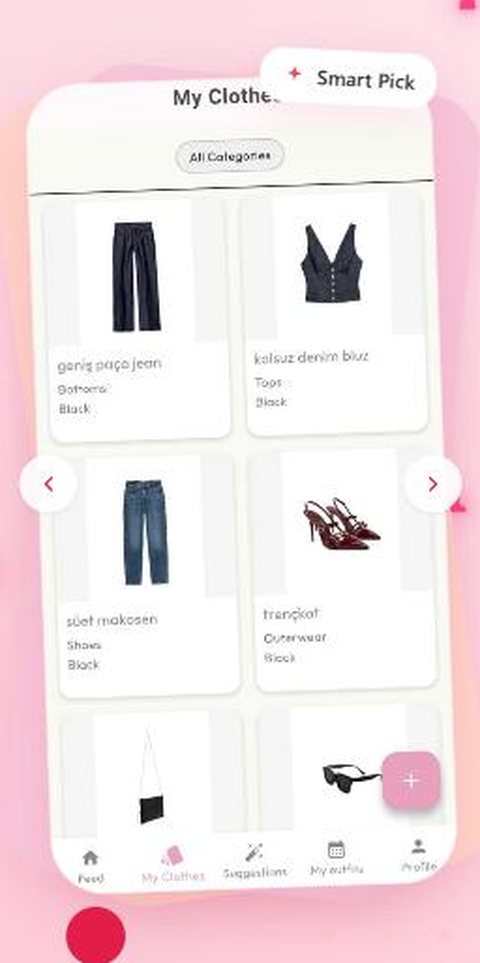
The "My Clothes" screen — every uploaded piece organized by category, color and season, with a Smart Pick shortcut for an instant outfit suggestion
How istlook Chooses Your Outfit: Smart Suggestions by Season, Weather and Occasion
Once your digital wardrobe has enough pieces in it, istlook's outfit suggestion engine takes over the decision entirely. You choose the season you're dressing for, the occasion, whether it's a regular workday, a special event or something active, and the current weather, and the app cross-references those three filters against everything currently tagged in your closet to put together a full look. You're never limited to a single suggestion either: build a combination manually piece by piece, browse the smart generated suggestions the app puts together on its own, or tap once for a quick outfit and save whichever version you like best. Because the recommendation is always pulled from clothes you actually own, an istlook suggestion is something you can put on immediately rather than a shopping list disguised as style advice.
Planning Ahead with the Built-In Calendar
The suggestion engine becomes even more useful once you start saving outfits to specific dates on istlook's built-in calendar. Rather than repeating the same three outfits on rotation without noticing, you can match a saved combination to a Tuesday client presentation, a Friday dinner or a trip you're packing for days in advance, so the decision is already made before you even open your closet that morning. For anyone who plans their week on Sunday night, or packs for a trip a few days ahead of time, this turns istlook from a same-day outfit picker into a full daily style planner that takes the "what should I wear" question out of the morning altogether.
Try the Free Outfit Generator Without Downloading the App
If you'd rather see how the outfit-picking logic works before installing anything, istlook's free, browser-based Outfit Generator runs the same core idea with no account and no download. You start by picking one of three wardrobes to draw suggestions from: Women's Clothing for the full women's wardrobe from everyday to special occasions, Hijabi Women's Clothing, which pulls specifically from hijabi-friendly pieces including shawls and scarves, or Men's Clothing for work, sport and special-occasion looks. From there the tool works exactly the way the in-app suggestion engine does.

The Outfit Generator's starting screen — pick Women's, Hijabi Women's or Men's Clothing to get suggestions matched to that wardrobe
From that starting screen you mark the season, the occasion and the weather the same way you would inside the app, then generate an outfit with a single click and get a full breakdown by piece: top clothing, bottom wear, shoe, outerwear, an accessory and a bag, pulled from hundreds of catalog pieces rather than your own closet. If the first result isn't quite right, the "Try Another Outfit" button generates as many new combinations as you want at no cost, which makes the tool a fast way to answer a "what should I wear today" question even before you've uploaded a single item of your own.

A generated outfit from the free tool — season, occasion and weather filters on top, the full piece-by-piece result below
From Work Mornings to Weekend Trips: Who Actually Uses an App Like This
The same digital wardrobe and outfit suggestion tools end up solving fairly different problems depending on who's using them. Someone getting dressed for the office wants a fast, weather-appropriate answer before an early meeting; a student wants their lecture-hall outfit to survive a walk across campus and a stop at the library afterward; someone packing for a weekend trip wants to know their whole suitcase works together before they've even left the house. Because every istlook suggestion, whether it comes from the full app or from the free Outfit Generator, is built from real seasonal and occasion tags rather than generic trend advice, it holds up across all three situations without needing a different tool for each one. If you're looking for more ready-to-wear inspiration for a specific dress code, our guide to hijabi outfit ideas for work, university and everyday life walks through eight combinations built the same way, straight from a real wardrobe.
Add your own pieces to your digital wardrobe, let istlook learn what works for each season, occasion and weather, and save outfits you can reach for on any morning without a second thought.
Whether you start with the free Outfit Generator for a quick answer or go straight to building your own digital wardrobe inside the app, the goal behind istlook stays the same: fewer minutes spent staring into a closet, and a style that's actually pulled from clothes you already own.
More Outfit Ideas to Try
These guides cover related looks and pieces from the same season.
- Office outfit ideas: what to wear to work, from blazers to dresses.
- Plaid outfit ideas: tartan blazers, skirts, trousers and coats.
- Poncho outfit ideas: how to style a poncho with denim, slip dresses and trousers.
- Leather jacket outfit ideas: bikers, bombers, blazers and a leather trench.
- Knee-high boots outfit ideas: how to wear knee-high boots with jeans, skirts and dresses.